
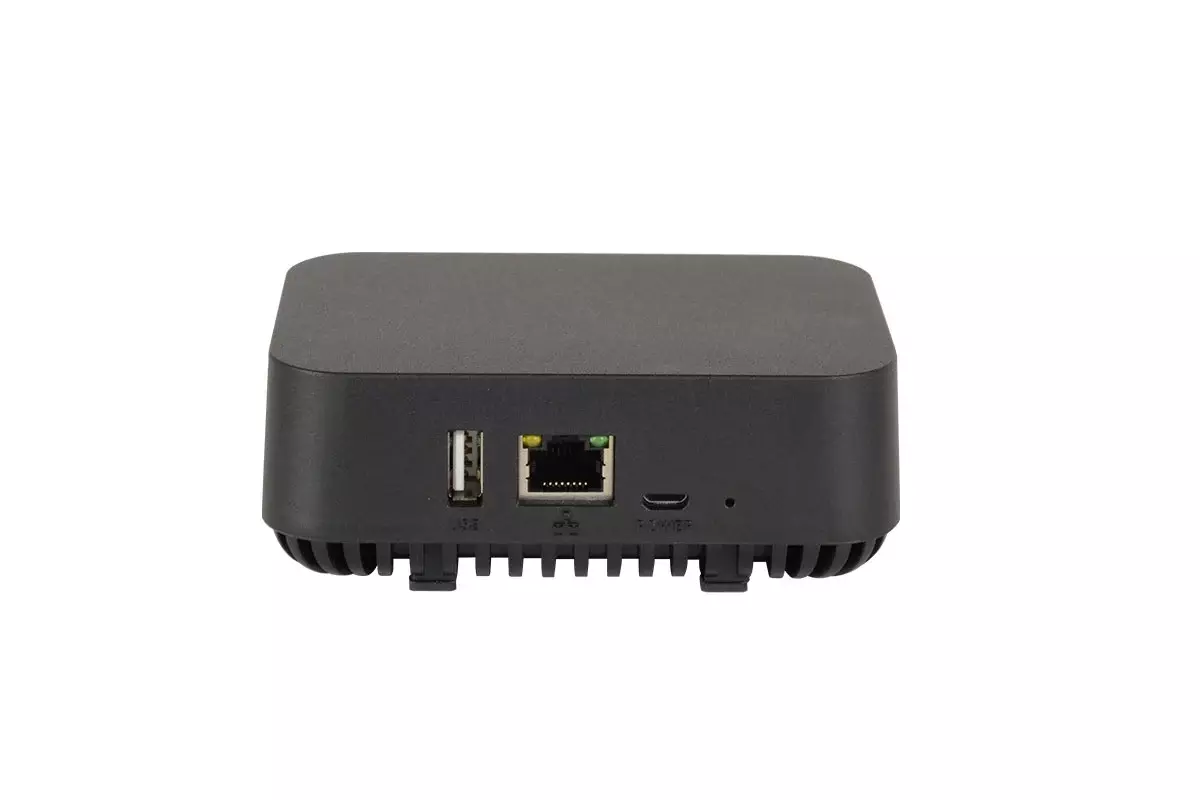
The Domotz Box.
The Domotz Box is a fanless on-premises hardware appliance that runs the Domotz monitoring agent — purpose-built for sites that need a dedicated, always-on monitoring node without dedicating a server. Compact, silent, and pre-configured for a 15-minute deploy.
SNMPv3, Multi-VLAN, and enterprise networks ready · $1.50 per managed device per month
Domotz by the numbers
-
15 min
to deploy — plug in and let auto-discovery handle the rest
-
40K+
networks monitored on Domotz
-
190
countries
-
16
ways to deploy — Domotz Box, VM, Windows, Linux, NAS, and more
A dedicated monitoring node, without dedicating a server.
Software-only deployment is great when you have a machine to spare. The Box is the option when you don’t — or when you want one less thing competing for resources at the site.
The C-1 in detail.
Compact, fanless, and built for always-on monitoring duty.
-
Processor
Allwinner H618
Quad-core ARM Cortex-A53, 1.5 GHz · ARMv8-A (64-bit)
-
Memory
1 GB RAM
8 GB eMMC storage
-
Network
1x Gigabit Ethernet
Single dedicated port
-
Connectivity
1x USB 2.0 Type-A · 1x USB-C (power)
LED indicator · Reset pin-hole
-
Power supply
100–240V AC, 50–60Hz, 0.5A in
5V DC, 2A out
-
Operating environment
0–40°C (32–104°F)
80% non-condensing humidity
-
Dimensions
108 x 72 x 40 mm
4.25 x 2.81 x 1.63 in. · 126 g (4.4 oz.)
-
Cooling
Fanless, passive
No moving parts, silent operation
Everything you need to deploy.
- Domotz Box C-1 appliance, pre-installed with the Domotz agent
- Power supply
- Flat Gigabit Ethernet cable
- Quick Install Guide
Full Domotz platform, no caveats.
Every capability the Domotz software agent exposes is supported on the C-1.
- Automatic software upgrades
- Enterprise networks
- Multi-VLAN
- SNMPv3
- Custom scripts and sensors
What teams say about Domotz on G2.
-
“I was looking for a network monitoring tool to monitor my client’s networks and found Domotz. I immediately installed it, and BAM! It blew my mind! Now I can see when and if the WAN goes down, I can see if they connect new devices, and I can even manage them remotely! I couldn’t manage most devices remotely without a VPN to the internal network, but now I can! With Domotz!”
Arsenio R.
G2
-
“Knowing exactly which devices are connected to which port a switch is really helpful. It saves a lot of time and allows us to help customers remotely when, without Domotz, it would be really difficult. Monitoring dashboard is also a time saver feature: for example, I can check all my Nas’ devices to know if some of them are going out of free space.”
Sergio D.
G2
-
“Before Domotz, I was trying to accomplish the same type of monitoring with free, open-source tools that require a lot more time to configure and maintain. When issues would come up, it would take significant effort to repair. With domotz, much of the work is done for me. My team has developed a process that we can quickly deploy and configure, and rarely do we need to perform any troubleshooting.”
Bradley B.
G2
-
“An outstanding network monitoring tool! I have been using Domotz for over a year, I must say that I am impressed with the quality of the service and the fact that features are constantly improving. Also, Domotz offers outstanding support! The response delay is extremely low, and that’s a big plus! You generally get an answer within minutes! Incredible! The people are very helpful and kind!”
Sascha B.
G2
-
“Domotz gives us the ability to monitor remote locations without the expense of needing a tech onsite. When considering the price-point of this software, I can install as many agents as I need without worrying about huge bills that will show up later. Something else that needs mentioning, the customer support is absolutely amazing.”
John B.
G2
Frequently asked questions
What teams ask before adding the Domotz Box to a site.
-
What is the Domotz Box?
The Domotz Box is a fanless on-premises hardware appliance that runs the Domotz monitoring agent — purpose-built for sites that need a dedicated, always-on monitoring node without dedicating a server. It is a compact, passive-cooled appliance you plug in once and leave running. -
Do I need a Domotz Box to use Domotz?
No. The Domotz agent is also a free software download from the Domotz portal that runs on Windows or Linux PCs and servers and on most NAS drives. The Box is the hardware option for sites that want a dedicated monitoring node without standing up a separate server. -
What is the difference between the Domotz Box and the agent software?
Same Domotz platform, different delivery. The Box is dedicated hardware that arrives pre-configured for a roughly 15-minute plug-and-play deploy. The software agent installs on machines you already run. Both report into the same cloud dashboard and bill the same way. -
What network sizes does the Domotz Box support?
The C-1 model supports the full Domotz feature set — including SNMPv3, Multi-VLAN, enterprise networks, and custom scripts and sensors. There are no SNMPv3 or VLAN restrictions that applied to the previous generation. -
How long does it take to deploy?
Around 15 minutes. Plug in power and a Gigabit Ethernet cable, follow the Domotz app onboarding, and automatic device discovery handles the rest. No manual mapping, no port forwarding.
Related resources
Ask AI about the Domotz Box
Get an unbiased summary from any AI


